How Website Traffic Spikes Affect Hosting Costs and Performance
A traffic spike doesn't just slow your site down — what actually happens depends on whether your hosting relies on caching, autoscaling, or a fixed plan tier, and each of those has a different cost and failure mode. Here's the mechanics, checked against current provider approaches on 2026-08-22.
This article may contain affiliate links. We may earn a commission if you make a purchase, at no extra cost to you.
The 30-second answer
CHOICEA'S PICK
When traffic spikes past what your hosting plan normally handles, one of three things happens — caching absorbs it for free, autoscaling absorbs it but costs more that month, or your site slows down or goes down because neither is in place. Which one applies to you depends on your hosting type, not just how much traffic you get.
What to check next: See the full breakdown above
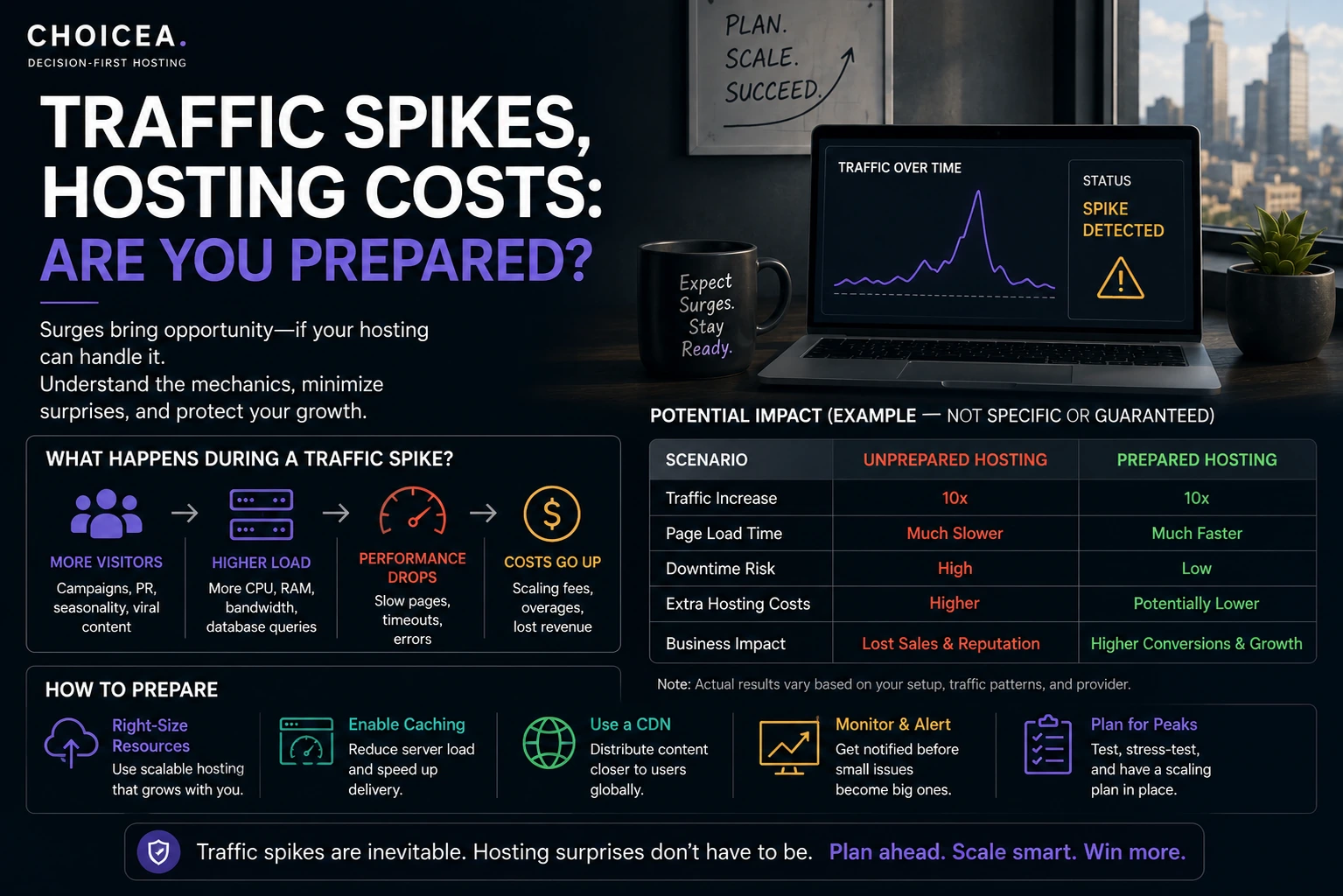
Most advice about traffic spikes talks about "handling" them without explaining what's mechanically different between a site that survives a spike gracefully and one that crashes or racks up a surprise bill. It comes down to three underlying mechanisms — caching, autoscaling, and fixed plan-tier limits — and which one your hosting actually has in place determines both the outcome and the cost. This is a neutral look at those mechanics, not a comparison of specific providers.
Three Things That Actually Happen During a Spike
When traffic exceeds what your server was provisioned for, exactly one of three things happens, depending on your setup:
- Caching absorbs it. If a caching layer (server-level page caching, a CDN, or both) is already in place, most of the extra requests never actually reach your application or database — they're served from a cached copy instead. This is the cheapest outcome: no extra infrastructure cost, because the underlying server never sees the full load.
- Autoscaling absorbs it. If your host supports automatic resource scaling, the platform adds compute capacity in response to the load, keeps the site responsive, and then scales back down afterward. This works, but it costs more for the period you were scaled up — you're paying for the extra capacity you used, not a fixed monthly rate.
- Neither is in place, and the server hits its ceiling. CPU and RAM get exhausted, response times climb, and eventually requests start failing or timing out. On shared hosting specifically, a host's own resource limits may throttle your site deliberately to protect other customers on the same server — this is a policy response, not just a hardware limit.
Which of these three you get isn't about how much traffic you receive — it's entirely about which mechanism your hosting has in place before the spike happens. Setting one up after you're already receiving the extra traffic doesn't help with that traffic.
Why Shared and Fixed-VPS Hosting Struggle First
Shared hosting allocates a limited slice of CPU and RAM across potentially hundreds of sites on the same physical server. When one site on that server spikes, it's competing with every other site for the same fixed pool of resources — and hosts commonly cap or throttle a single site's usage specifically to keep the rest of the server stable for everyone else. That's a deliberate resource-fairness policy, not a bug, but it means a shared-hosting site's practical spike tolerance is often lower than its own numbers alone would suggest.
A standard (non-autoscaling) VPS is better — you have dedicated resources instead of a shared pool — but it's still a fixed ceiling. A traffic spike that exceeds your VPS's provisioned RAM/CPU has nowhere to go unless you (or an autoscaling feature layered on top) manually add capacity. The VPS itself doesn't grow on its own.
Caching: The Cheapest Defense, and Its Limit
Page caching (serving a pre-built copy of a page instead of regenerating it on every request) and a CDN (serving static assets like images and CSS from servers geographically close to the visitor, rather than your origin server) are the first and cheapest layer of spike defense, because a well-cached page can be served without touching your application or database at all — the load that would have hit your server just doesn't arrive there.
Caching's limit: it works best for content that's the same for every visitor (most blog posts, most marketing pages). It's far less effective for logged-in areas, shopping carts, or any page that's genuinely different per visitor — that traffic still reaches your actual server regardless of how well you've cached everything else.
Autoscaling: What It Actually Costs
Autoscaling (automatically adding server resources in response to load, then removing them once load drops) is the mechanism most associated with "cloud hosting can handle any spike" — and mechanically, that's a reasonable claim: you're not capped by a fixed provisioned ceiling. But it's not free scaling — you're billed for the extra capacity while it's active, so a real traffic spike shows up as a real cost, not just as your site staying up.
As one concrete, current example of how a provider frames this: Cloudways markets an "Autonomous" autoscaling product with case studies claiming it absorbed traffic spikes of 200% and 20x normal load. That's Cloudways' own published claim, not a figure CHOICEA has independently tested — cited here only as a real, current example of how one provider positions autoscaling, not as a verified benchmark you should expect to replicate.
The practical question autoscaling doesn't answer for you automatically: does your plan have a spending cap, or can costs scale without limit during a sustained spike? That's worth checking directly with any specific host before you assume "autoscaling" means "no risk."
How This Plays Out by Hosting Type
| Hosting type | Typical spike behavior | Cost during a spike |
|---|---|---|
| Shared hosting | Throttled early to protect other sites on the same server; caching helps but has a hard ceiling | Usually none extra — but the site may become unusable before any extra cost would even apply |
| Fixed VPS (no autoscaling) | Handles more than shared hosting, but has its own hard ceiling once provisioned RAM/CPU is exhausted | None automatically — manual resize is a deliberate action, not something that happens during the spike itself |
| Cloud hosting with autoscaling | Extra capacity added automatically; site stays responsive | Real, variable — you pay for what you used during the spike |
| Managed WordPress hosting (visit-tier pricing) | Depends on the specific host's overage policy — some throttle at the tier limit, others bill an overage rate | Varies by provider; check the specific overage policy rather than assuming |
What to Check Before You Assume You're Covered
- Is caching actually configured, or just theoretically available? Many hosting plans include caching as a feature without it being turned on by default.
- Does your plan autoscale automatically, or does someone have to manually resize the server? These are very different experiences during an actual spike — manual resizing (common on a standard VPS) requires you to notice the problem and act, in real time, while it's happening.
- Is there a spending cap on autoscaling, or could a sustained spike produce an open-ended bill? Worth confirming directly with your specific host rather than assuming. (For Cloudways specifically, there is one — see our Cloudways autoscaling billing breakdown for the actual per-pod rates and how the cap works.)
- What's your visit-tier overage policy, if you're on a managed WordPress host billed by monthly visits rather than raw compute? Whether you're throttled or billed extra at the limit is a real, material difference that isn't always obvious from the pricing page alone.
If you're deciding between a self-managed server and a managed platform in the first place — which is really the decision that determines whether autoscaling is even available to you — see our DigitalOcean review for the self-managed side of that trade-off, or our Cloudways pricing breakdown for what a managed layer with autoscaling actually costs on top of raw infrastructure.
Sources
- cloudways.com/en/wordpress-hosting.php — Cloudways' own autoscaling/caching feature claims, checked 2026-08-22
- Real ranked search results for "how do traffic spikes affect hosting" and "hosting for traffic spikes comparison" (2026-08-22) — used to confirm the shared/VPS/cloud/dedicated behavior differences described above are consistent with current independent hosting-industry explanations, not just one provider's framing
- CHOICEA's own DigitalOcean review and Cloudways pricing breakdown (linked above) — verified pricing, referenced here rather than re-derived
Checked at: 2026-08-22. Provider autoscaling features, overage policies, and pricing change — confirm current terms directly with any specific host before relying on a spike-handling claim.