Cloudways Pricing Explained — What You're Actually Paying For
Cloudways runs two different pricing models — a DigitalOcean-matched per-server plan (Flexible) and a flat-tier, unmetered-visits WordPress plan (Autonomous). Here's every tier on both, the real dollar gap versus raw infrastructure, and which model fits which workload.
This page may contain affiliate links. We may earn a commission if you make a purchase, at no extra cost to you.
The 30-second answer
CHOICEA'S PICK
Cloudways prices two structurally different products. Flexible bills by server resources (RAM/vCPU), starting at $11/mo for 1GB, and costs 55-100% more than provisioning the same DigitalOcean spec directly — that premium pays for managed operations, 24/7 support, and a dashboard instead of raw command-line access. Autonomous bills by flat WordPress-specific tier instead ($99-$399/mo, unmetered visits), and fits a different kind of buyer entirely. Which one you should be pricing depends on your workload, not just which number looks smaller.
What to check next: Check current pricing on Cloudways
If this option fits you
You'll find current pricing under Cloudways' own Pricing menu.
Check current pricing on CloudwaysPR / This link goes to our partner's official site (affiliate link). We may earn a commission if you make a purchase, at no extra cost to you. Pricing and promotions may change — please check the official site for current terms.
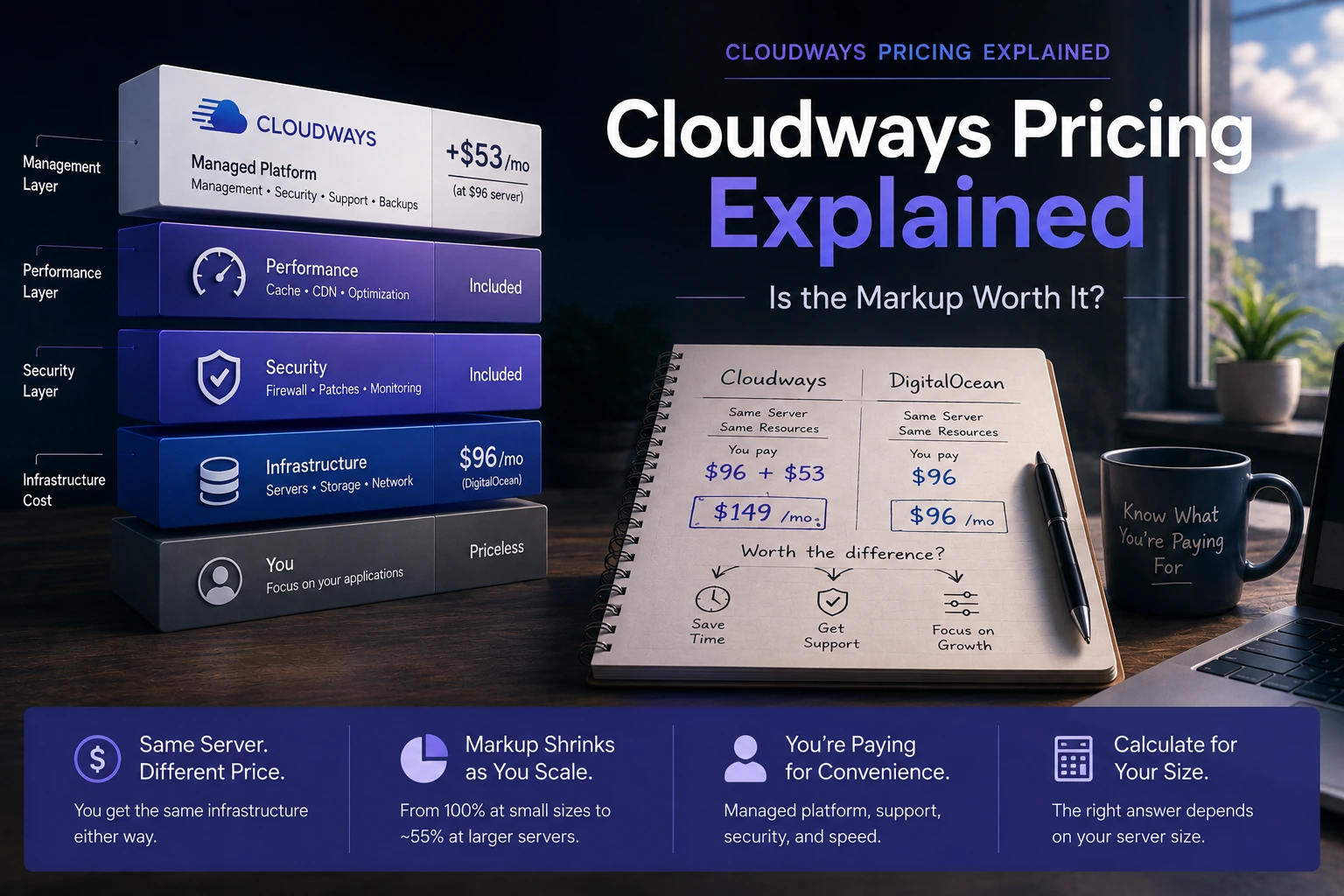
Cloudways actually sells two structurally different products, and most pricing comparisons online only cover one of them. Flexible is the classic model — you provision a server on DigitalOcean (or AWS, Vultr, Linode, or Google Compute Engine) infrastructure and pay Cloudways a management premium on top, billed by RAM/vCPU like the underlying server itself. Autonomous is newer and different — a Kubernetes-based, WordPress-only product billed in flat monthly tiers with unmetered visits, not tied to a specific server spec at all. This page explains what you're actually paying for under each model, with the real, checkable numbers for both — not a verdict on whether Cloudways "wins" against any one competitor (see Cloudways vs DigitalOcean for that specific head-to-head instead).
What the markup actually buys
At every size, Flexible costs more than DigitalOcean direct — 100% more at 2GB, 91.7% more at 4GB, 83.3% more at 8GB, 55.2% more at 16GB. That's a real, checkable gap, not a vague impression. But "Cloudways costs X% more" isn't the full picture — the entry tier and the higher tiers matter too, and so does what that extra money buys.
The real dollar gap, by server size
We matched each Cloudways Flexible (DigitalOcean-Standard) plan to the DigitalOcean Basic Droplet with identical RAM, vCPU count, storage, and bandwidth allowance — not just similar-sounding plan names.
| RAM | vCPU | Storage | Transfer | Cloudways | DigitalOcean direct | Difference | Raw premium |
|---|---|---|---|---|---|---|---|
| 1GB | 1 | 25GB | 1TB | $11/mo | — | — | — |
| 2GB | 1 | 50GB | 2TB | $24/mo | $12/mo | +$12/mo | 100% |
| 4GB | 2 | 80GB | 4TB | $46/mo | $24/mo | +$22/mo | 91.7% |
| 8GB | 4 | 160GB | 5TB | $88/mo | $48/mo | +$40/mo | 83.3% |
| 16GB | 8 | 320GB | 6TB | $149/mo | $96/mo | +$53/mo | 55.2% |
| 32GB | 8 | 640GB | 7TB | $240/mo | — | — | — |
| 48GB | 12 | 960GB | 8TB | $342/mo | — | — | — |
| 64GB | 16 | 1280GB | 9TB | $421/mo | — | — | — |
| 92GB | 20 | 1920GB | 10TB | $566/mo | — | — | — |
| 128GB | 24 | 2560GB | 11TB | $729/mo | — | — | — |
| 192GB | 32 | 3840GB | 12TB | $1,056/mo | — | — | — |
The 2GB-16GB rows match exactly on vCPU, storage, and transfer on both sides — a genuine like-for-like comparison across that range. (DigitalOcean's pricing page lists a second, higher-spec 2GB option at 2 vCPUs/$18/mo — that's a different plan, not the one matched above.) The 1GB row is Cloudways' actual cheapest published Flexible tier — several other pricing round-ups lead with this number as "Cloudways starts at $11/mo," which is accurate but easy to miss if you're only looking at the matched-spec table; we don't have a directly matched DigitalOcean 1GB droplet at identical specs to compare it against, so no premium percentage is shown for that row. The 32GB-192GB rows are the same situation at the other end of the range — real, current Cloudways prices, but we haven't independently matched them against equivalent DigitalOcean droplets, so no comparison or premium percentage is shown for any of them either.
Prices checked 2026-08-25 on cloudways.com/en/managed-digital-ocean-hosting.php and digitalocean.com/pricing/droplets (2GB-16GB rows re-verified unchanged since 2026-08-21; 1GB row added 2026-08-25). 32GB-192GB rows checked 2026-09-05 on cloudways.com/en/managed-digital-ocean-hosting.php — a footnote in this article previously referenced these tiers as "newly checked 2026-08-25," but the figures were never actually added to this table until now; that gap is now closed. Cloudways was showing a "40% off for 4 months" promotion and a separate "30% off for 3 months" offer at the time of the original check — neither promotional rate is used anywhere in this article, since neither is a stable price to build a comparison on. Confirm current pricing before you buy either.
What that money buys you
Cloudways' own pricing page states that 24/7/365 support and free SSL are included on every plan — that's a direct, stated inclusion, not an inference. Beyond what's explicitly listed, the managed layer generally covers server provisioning and ongoing maintenance, migration tooling to move an existing site over, firewall and security configuration, built-in Object Cache, Redis, staging and cloning environments for testing changes safely, and a web dashboard in place of SSH-only management.
We don't have a real dollar figure for what it would cost to replicate all of that yourself — pricing out a comparable backup service, a security service, and the value of your own time isn't something we fetched or verified, so we're not inventing a number for it. What we can say with confidence is that the list above is real (stated or reasonably inferred from Cloudways' own product), not a vague hand-wave at "convenience."
Why the percentage shrinks as servers get bigger
The dollar gap grows with server size — $12/mo at 2GB, up to $53/mo at 16GB — but the percentage gap shrinks the whole time, from 100% down to 55.2%. Put another way: the managed layer appears to cost roughly a similar amount of extra work to provide regardless of server size, which makes it a proportionally bigger add-on on a small server and a proportionally smaller one on a large server. If you're planning to scale up, that's a real, useful piece of decision information — the relative cost of staying on Cloudways gets easier to justify as your server size grows, even though the absolute monthly bill is higher.
Cloudways Autonomous — the other pricing model
Everything above is Cloudways' Flexible plan — the classic model, billed by server resources. Cloudways also sells Autonomous, a structurally different product: Kubernetes-based, WordPress-only, and priced in flat monthly tiers with unmetered visits instead of a fixed server spec. As of 2026-08-25, the published tiers are:
| Plan | Price | Disk | Visits | Baseline servers |
|---|---|---|---|---|
| Free Trial | $0 | 15GB | 30,000 | — |
| Growth | $99/mo | 20GB | Unmetered | 1 (autoscaling) |
| Scale | $199/mo | 50GB | Unmetered | 2 |
| Plus | $399/mo | 100GB | Unmetered | 3 |
| Enterprise | Custom | — | Unmetered | — |
Checked 2026-08-25 on cloudways.com/en/pricing.php.
The decision between the two models isn't "which is cheaper" — they're priced on different axes entirely, the same way Kinsta's visit-based pricing isn't directly comparable to a RAM-based tier (see our Kinsta vs WP Engine piece for that same structural pattern with a different provider). Autonomous fits you if your workload is WordPress-only and you specifically want to stop thinking about visit spikes hitting a fixed server ceiling — unmetered visits mean a traffic surge doesn't force a manual resize the way it could on Flexible. Flexible still fits you if you're running anything other than WordPress on the same infrastructure, or you'd rather pay for a known, fixed server spec than a flat tier you might be over- or under-provisioned for. If you're specifically weighing Autonomous's unmetered-visits promise against what happens to a Flexible server during a real traffic spike, see our traffic spikes explainer for the underlying caching/autoscaling mechanics either model actually relies on.
We don't have real-world data on how Autonomous's "baseline server" counts scale in practice under sustained load beyond what Cloudways states on its own pricing page — that's a genuine limit of what we can verify from a pricing page alone, not something we're papering over with an inferred number.
For the fuller decision framework behind Flexible vs Autonomous — including the Standard-vs-Premium droplet hardware choice that only applies inside Flexible on DigitalOcean — see Cloudways Flexible vs Autonomous. This page covers the dollar tables; that one covers which product actually fits your workload.
If this option fits you
You'll find current pricing under Cloudways' own Pricing menu.
Check current pricing on CloudwaysPR / This link goes to our partner's official site (affiliate link). We may earn a commission if you make a purchase, at no extra cost to you. Pricing and promotions may change — please check the official site for current terms.
Who this is for
- You're deciding between Cloudways and self-managing a DigitalOcean droplet for a WordPress site, PHP application, or general web workload.
- You want the actual dollar and percentage gap at your server size, not a generic "Cloudways is expensive" impression.
- You're trying to work out whether managed convenience is worth paying for, not just whether it exists.
Who should skip it
- You already know you want fully-managed, WordPress-only hosting — Cloudways supports more than WordPress, which is a different trade-off than a WordPress-specific host (see Cloudways vs Kinsta for that direct head-to-head, or our Kinsta vs WP Engine comparison for WordPress-only options beyond Cloudways entirely).
- You've already decided you're comfortable managing a server yourself and just want DigitalOcean's own pricing without the comparison.
Choose Cloudways when / choose DigitalOcean direct when
Choose Cloudways when you want the managed layer — 24/7 support, security configuration, backups, staging tools — on top of DigitalOcean's infrastructure, and you're willing to pay $12-53/mo more for it depending on server size.
Choose DigitalOcean direct when you're comfortable managing a server yourself and want to minimize recurring cost — the savings are largest in percentage terms on smaller servers specifically.
Use cases
Solo developer, comfortable with server administration. The $12-53/mo gap is likely money spent on convenience you don't need if you're already handling your own security patching and backups.
Small business without in-house server expertise. The managed layer replaces what you'd otherwise have to hire or contract for — at that point the premium reads more like a labor-cost trade-off than a pure infrastructure markup. See our managed hosting break-even framework if you want to work through that trade-off with your own numbers rather than a general impression.
Agency managing hosting for multiple client sites. Cloudways' staging/cloning tools and centralized dashboard have value that compounds across many servers in a way a single-server comparison doesn't fully capture — though we don't have real per-agency pricing data to put a number on that specifically.
These three scenarios are reasonable inferences from the feature list and pricing structure, not survey data or case studies — a starting point for your own decision, not a verdict.
Alternatives
If your workload is WordPress-only and you want a host built specifically for that (no server-level access or configuration at all), that's a different trade-off than Cloudways offers — see our Kinsta vs WP Engine comparison. If you've already decided you want to skip the managed layer entirely, see our DigitalOcean review for a workload-based guide to picking a droplet size directly. Not sure Cloudways is the right starting point at all? See our Cloudways alternatives guide for the broader decision framework. Already sure you want Cloudways but unsure which of its own products to pick? See Cloudways Flexible vs Autonomous.
FAQ
Is Cloudways just reselling DigitalOcean?
For its DigitalOcean-Standard plans, yes — Cloudways provisions DigitalOcean infrastructure and adds its management layer on top. Cloudways also offers plans on AWS and Vultr; this article covers the DigitalOcean-based option specifically, since that's where we have verified pricing on both sides.
Is the 2GB comparison a fair one?
Yes — Cloudways' 2GB plan (1 vCPU/50GB/2TB) matches DigitalOcean's own 1 vCPU/50GB/2TB Basic Droplet exactly. DigitalOcean also lists a separate, higher-spec 2GB option at 2 vCPUs/$18/mo, which isn't the one we're comparing against here.
Does the managed layer cost the same no matter the server size?
We don't have exact operational-cost data from Cloudways, but the pattern in the pricing — a shrinking percentage premium as size increases — is consistent with the managed layer costing roughly a similar flat amount to provide, rather than scaling with server size the way infrastructure cost does.
What is Cloudways Autonomous, and is it cheaper than Flexible?
Autonomous isn't a cheaper version of Flexible — it's a different product (WordPress-only, flat-tier, unmetered visits, Kubernetes-based) aimed at a different question: not "how much does this server cost" but "what does WordPress hosting with no visit ceiling cost." Comparing a $99/mo Autonomous Growth tier against a $88/mo Flexible 8GB server isn't a fair like-for-like — they scale on different axes. See the Autonomous section above for the full tier table, or Cloudways Flexible vs Autonomous for which product actually fits your workload rather than just the price tables.
Bottom line
Cloudways isn't one price — it's two different pricing models depending on what you're building. On Flexible, you're paying a real, checkable 55-100% premium over raw DigitalOcean infrastructure for managed operations, support, and a dashboard; that premium shrinks in percentage terms as servers get bigger. On Autonomous, you're paying a flat WordPress-specific tier for unmetered visits instead of a fixed server ceiling. Decide based on which axis your workload actually needs — not a single number.
Want a direct head-to-head verdict on Cloudways vs. self-managing DigitalOcean instead of a pricing breakdown? See Cloudways vs DigitalOcean. Not sure Cloudways is the right starting point at all? See Who Should (and Shouldn't) Use Cloudways. Want Kinsta priced into the same comparison at a matched workload? See The Real Cost of Hosting.
Sources
- Cloudways Flexible (DigitalOcean-Standard) pricing: cloudways.com/en/managed-digital-ocean-hosting.php (2GB-16GB rows checked 2026-08-21, re-verified unchanged 2026-08-25; 1GB row checked 2026-08-25; 32GB-192GB rows checked and added to the table 2026-09-05)
- Cloudways Autonomous pricing: cloudways.com/en/pricing.php (checked 2026-08-25)
- DigitalOcean Basic Droplet pricing: digitalocean.com/pricing/droplets (checked 2026-08-21)
- Cloudways affiliate program terms (unrelated to the customer pricing above): cloudways.com/en/web-hosting-affiliate-program.php (checked 2026-08-21)
Price checked at: 2026-09-05 (32GB-192GB Flexible rows added — previously referenced in this article's own Sources footnote but never transcribed into the table; the 1GB-16GB Flexible rows and Autonomous pricing are unchanged since the 2026-08-25 check). Hosting prices and promotions change — confirm current rates on each provider's site before making a decision.